How Can Anki Improve Your Flashcard Study?
Anki flashcard software is worth using when you need to remember information for more than a few days, but it works best if you start small. Choose the official app for your device, make simple cards from material you already understand, and let Anki schedule reviews based on how honestly you rate your recall.

What Is Anki Flashcard Software?
Anki is a flashcard program built around two study habits that matter: trying to remember before you see the answer, and reviewing again before the memory fades too much. That makes it different from rereading notes or flipping through a stack of cards in the same order every time.
The practical benefit is priority. Easy cards gradually appear less often, while weak cards return sooner. That is why Anki is useful for language vocabulary, exam facts, anatomy labels, coding syntax, music theory, and other material where long-term recall matters.
Active recall through flashcards
Active recall means you try to pull the answer from memory before revealing it. A card asking "What is the capital of Canada?" is useful because the effort happens before you see "Ottawa," not after.
Spaced repetition for review timing
Spaced repetition is Anki's timing system. After each card, you rate how well you remembered it, and Anki uses that feedback to decide when the card should come back.
- Easy recall: the card can wait longer.
- Slow or uncertain recall: the card should return sooner.
- Forgotten cards: the card needs closer review or a clearer prompt.
Modern Anki also supports FSRS, a newer scheduler that can use your review history to estimate timing more precisely. Beginners do not need to master scheduling settings on day one; honest reviews and clear cards matter more at the start.

Which Anki Version Should You Download?
Start with the official Anki ecosystem, because similarly named apps can confuse beginners. For most people, the desktop app is the best base for creating and organizing cards, while a phone app is best for short daily reviews.
| Device or need | Best official option | Best use |
|---|---|---|
| Windows, Mac, or Linux | Anki desktop | Creating decks, editing cards, managing settings |
| Android phone or tablet | AnkiDroid | Free mobile reviews and quick edits |
| iPhone or iPad | AnkiMobile | Official native iOS/iPadOS app |
| Any browser | AnkiWeb | Syncing and light browser reviews |
What Can Anki Cards Include?
Anki cards can be plain text, but they do not have to be. The best card type depends on what you are trying to remember: a fact, a missing word, a label on a diagram, a sound, or a formatted explanation.
Beginners should not try every feature at once. Start with basic cards and cloze deletions, then add images, audio, or Image Occlusion when the material actually benefits from them.
Basic questions and answers
Basic cards are the classic front-and-back format. They work well for definitions, translations, formulas, dates, and short facts where the answer is clear.
A good card asks one thing: "What does mitosis produce?" is much better than "Explain cell division." If the answer takes a paragraph, the card probably needs to be split.
Cloze deletions for missing words
Cloze deletions hide part of a sentence and ask you to fill the gap. They are useful when context matters, such as grammar patterns, textbook phrasing, formulas inside a statement, or medical terms in a sentence.
Keep the hidden part focused. One important blank usually teaches better than a sentence full of gaps that feels more like a puzzle than a memory check.
Image Occlusion for diagrams
Image Occlusion lets you cover labels or parts of an image and turn them into cards. It is especially useful for anatomy, maps, circuits, software interfaces, and any topic where the visual layout is part of what you need to remember.
For example, an anatomy student can hide one structure on a heart diagram and recall the label from its position. That is more realistic than memorizing a plain list of terms, because exams and practical work often show the diagram, not the list.
Audio, images, and formatted text
Anki can also include audio, screenshots, pictures, bold text, italics, and line breaks. These are helpful when they make recall closer to the real task.
- Language study: add pronunciation audio or example sentences.
- Music practice: test recognition by sound.
- Technical learning: use screenshots for interfaces or error messages.
- Science subjects: add images only when the image carries useful information.
How to Start Using Anki
The easiest way to start is not to import a huge shared deck or change every setting. Install the official app, create one small deck, add a few cards from material you already understand, and review for several days before expanding.
Install from the official download links
Download Anki from official sources only: the official Anki website for desktop, AnkiDroid for Android, AnkiMobile for iPhone and iPad, and AnkiWeb for browser access and syncing. This avoids copycat apps and keeps syncing compatible.
Create a deck and add a few cards
Create one deck for your first subject and add a small batch of cards. Ten to twenty cards is enough to learn the review flow without creating a workload problem.
- Good first deck: one chapter, one vocabulary list, or one small topic.
- Good first card: one prompt with one clear answer.
- Bad first move: importing thousands of cards before you know how reviews feel.
Review and rate your recall honestly
During review, answer before you flip the card. Then rate the card based on what actually happened, not what you wish had happened.
If the answer came quickly, give it a stronger rating. If you guessed, hesitated, or only half-remembered, rate it lower. These ratings are not about pride; they are the data Anki uses to schedule the next review.
Set up AnkiWeb sync
Set up AnkiWeb sync early, even if you only use one device at first. It gives you a backup and makes it easier to add cards on a computer while reviewing on a phone later.
How to Keep Anki Reviews Manageable
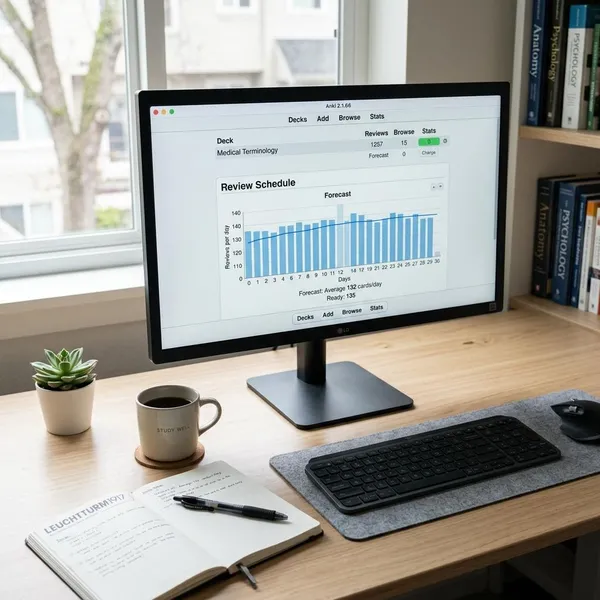
The biggest Anki problem for beginners is usually not the software itself. It is review debt: too many cards, unclear prompts, missed sessions, and a growing pile of reviews that starts to feel like punishment.
Keep your system boring at first. Add fewer cards than you think you can handle, review consistently, and fix bad cards instead of repeatedly failing them.
Test one idea per card
Each card should usually test one memory target. If one card asks for a definition, two exceptions, and an example, you will not know how to grade yourself when you remember only part of it.
Split overloaded cards into smaller ones. The reviews become faster, and Anki gets cleaner feedback about what you actually know.
Understand the material before memorizing
Anki is strongest after basic understanding. If you put confusing lecture notes straight into cards, spaced repetition will make you see the confusion more often, not solve it.
For a math formula, know what the symbols mean before memorizing it. For a foreign word, learn a simple usage example instead of only memorizing an isolated translation. This is the difference between useful recall and brittle memorization.
Limit new cards and review consistently
New cards create future reviews, so today's enthusiasm can become next week's backlog. If you are new, choose a modest daily limit and raise it only after the routine feels easy for several days.
Someone reviewing during a commute may do better with a small steady deck than a heavy exam-style load. Someone preparing for a high-stakes test may add more cards, but should still watch the review count and reduce new cards when daily reviews start taking too long.
Rewrite confusing prompts
Repeated failure is often a card-quality problem. Replace vague prompts like "enzyme regulation?" with a specific question, such as "What is allosteric regulation?" or "What does a competitive inhibitor affect?"
- Too broad: split it.
- Too vague: rewrite the question.
- Too many possible answers: add context.
- Still confusing: go back to the source material before reviewing again.
Conclusion
Anki works best when you treat it as a small daily memory system, not a place to dump every note you own. Start with the official app, make clear cards, review honestly, and slow down new cards before the workload becomes annoying. If the deck feels manageable after a week, you can expand with more card types, media, and settings without losing the habit that makes the software useful.