How to Use Asana CRM for Leads and Customers
You can use Asana as a CRM if your sales process is simple and your main problem is keeping leads, owners, and follow-ups visible. It is a good fit for small teams that already work in Asana, but it is not a full replacement for a sales platform with deep email tracking, forecasting, lead scoring, or complex reporting.

Can You Use Asana as a CRM?
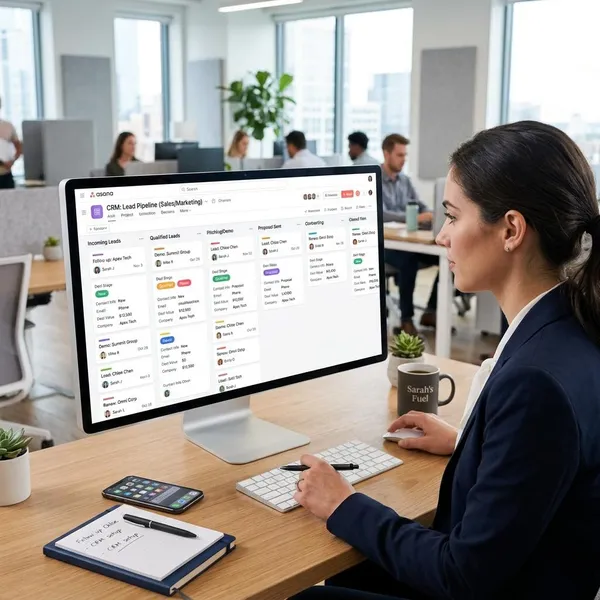
Asana can work as a lightweight CRM because its core features line up well with basic sales work: tasks, owners, due dates, comments, custom fields, and workflow stages. The easiest way to think about it is simple: each lead becomes a task, and each pipeline stage becomes a section or board column.
Track leads and opportunities
For basic lead tracking, one task per lead works well. The task can hold the contact name, company, notes, attachments, deal value, source, and next step. Moving that task through sections such as New Lead, Qualified, Proposal Sent, and Closed-Won gives the team a clear pipeline view without adding much admin work.
Manage customer accounts
Asana can also handle simple account management after the deal closes. A small team might keep one task per customer for renewal reminders, review calls, open issues, or ongoing relationship notes.
Assign follow-ups and next steps
This is where Asana is strongest. Every lead should have a clear owner and a next follow-up date. Without those two pieces, your pipeline becomes a list of names instead of a working sales system.
Track basic deal information
Custom fields let Asana hold the basic deal data your team needs to make decisions. Start with only the fields people will actually update: deal value, lead source, expected close date, priority, and account owner are usually enough for a first setup.
Coordinate sales and customer work
Asana is a practical choice when sales and delivery are closely connected. For example, a web design studio might track a prospect in a sales pipeline, then turn the won deal into an onboarding project with design tasks, copy deadlines, and launch milestones. The value is not just tracking the sale; it is keeping the promise made during sales visible to the people doing the work.
How to Build a CRM in Asana
A useful Asana CRM does not need to be complicated. Build one central sales pipeline project, create a few clear stages, add one task for each lead, and make sure every task has an owner, a status, and a next follow-up date.
Create a sales pipeline project
Create a dedicated project for your pipeline rather than mixing leads into general team tasks. Board view is usually best if you want a visual drag-and-drop pipeline. List view can work better if your team prefers sorting by fields such as value, source, close date, or owner.
Add your pipeline stages
Your stages should match how your team actually sells. For many small teams, five to seven stages are enough:
- New Lead
- Qualified
- Discovery Call
- Proposal Sent
- Negotiation
- Closed-Won
- Closed-Lost
Create one task for each lead
Each lead task should be easy to scan. Use the lead or company name as the task title, then put contact details, background notes, and important context in the description. Comments are better for dated updates after calls, emails, meetings, or internal decisions.
Add custom fields for deal data
Custom fields turn a task board into something closer to a CRM. A simple starting setup might include:
- Deal value: estimated project value, contract value, or monthly revenue.
- Lead source: referral, website form, paid ad, event, outbound, or other source.
- Expected close date: the likely decision date, not the next reminder date.
- Priority: high, medium, or low based on value, urgency, and fit.
- Account owner: the person responsible for the relationship.
Assign owners and follow-up dates
Every active lead needs one responsible person and one next follow-up date. If you only enforce one rule in your Asana CRM, make it this one. Shared responsibility sounds collaborative, but in sales it often means nobody follows up.
Add notes and customer updates
Use notes for decisions, objections, budget clues, buying timeline, promised next steps, and customer preferences. A useful note is short but specific: "Prefers monthly plan, decision after board meeting on May 12" is far better than "Good call."
Automate routine actions with Rules
Rules are worth adding once your manual process is clear. You might automatically assign new leads, create a handoff task when a deal moves to Closed-Won, or notify a manager when a high-value opportunity reaches Proposal Sent.
What to Track in an Asana Sales Pipeline
The best Asana sales pipeline tracks only the information needed to answer practical questions: What stage is this deal in? What is it worth? Who owns it? When should we follow up? Where did it come from?
Deal stage
Deal stage shows where the opportunity sits in your process. In Asana, this is usually the task's section or board column. Make sure each stage has a clear meaning, so one person does not use "Qualified" for a warm inquiry while another uses it for a booked sales call.
Deal value
Deal value helps you avoid treating every opportunity as equal. A rough estimate is often enough for a lightweight setup, as long as the team uses the same logic each time.
- Project-based work: use estimated project budget.
- Recurring services: use monthly or annual recurring value.
- Mixed offers: choose one method and keep it consistent.
Lead source
Lead source tells you where the opportunity came from, such as referral, website form, paid ads, event, partner, social media, or outbound outreach. Use a dropdown field instead of free text if possible, because "website," "site form," and "web lead" can turn into three messy versions of the same thing.
Account owner
The account owner is the person accountable for the relationship. For a very small team, Asana's normal assignee field may be enough. If several people touch the same customer, a separate owner field can prevent confusion between "person doing this task" and "person responsible for the account."
Expected close date
Expected close date is useful for rough planning, but only if it gets updated. Treat it as your best current estimate of when the customer may decide, not as a fixed promise.
Priority
Priority should tell the team where attention should go first. A simple High, Medium, Low field is usually enough, but define it clearly. High priority might mean high value, strong fit, near-term decision, or an urgent customer need.
Next follow-up
Next follow-up is the field that keeps the pipeline alive. You can use the task due date or a separate custom date field, but every active opportunity should have one.
- No next follow-up: the lead is at risk of being forgotten.
- Overdue follow-up: review it before adding more new leads.
- Repeatedly delayed follow-up: decide whether the lead is still real.

Asana CRM Templates and Automation
Templates and automation help most when they make the sales process more consistent, not when they make the setup look more advanced. Start with a basic pipeline template, adjust it to match your real workflow, then add automation only where people keep forgetting the same step.
Sales pipeline templates
Sales pipeline templates are useful if you want a quick starting structure with stages, example tasks, and suggested fields. Do not copy the template blindly. Rename stages, remove fields you do not need, and add only the details that match your selling process.
For a team setting up its first CRM-like workflow, a template can also expose process gaps. If nobody agrees when a lead is "qualified," fix that definition before adding more fields or dashboards.
Account tracking templates
Account tracking templates are better for post-sale work than lead management. They can help you track renewal dates, review calls, onboarding tasks, open issues, account health, and customer success actions.
Custom fields
Custom fields should support decisions, not just store information. If a manager filters by priority every Monday, priority is worth tracking. If nobody ever uses customer segment, remove it until there is a clear reason to bring it back.
Rules and reminders
Rules and reminders are best for repetitive actions that are easy to miss. Useful examples include assigning a new lead when it enters the pipeline, creating an onboarding handoff when a deal is won, or reminding the owner when a follow-up is overdue.
- Automate handoffs when missed transitions cause problems.
- Automate reminders when leads go quiet too often.
- Avoid over-automation if the team starts ignoring notifications.
Reporting dashboards
Asana dashboards can give you a basic view of pipeline activity: leads by stage, overdue tasks, workload by owner, and progress across projects. That is enough for many small teams that mainly need visibility.
They are not a substitute for deep sales analytics. If leadership needs weighted forecasts, conversion rates by rep, quota tracking, or detailed revenue reporting, that is usually where a dedicated CRM becomes more appropriate.
CRM integrations
Integrations can make Asana more useful without forcing it to become your only customer system. For example, a website form can create a new Asana lead task, a chat tool can notify the team about urgent customer work, or a dedicated CRM can send won deals into Asana for delivery.
When Does Asana Work Well as a CRM?
Asana works well as a CRM when the sales process is easy to represent as tasks moving through stages. It works less well when the business needs a full customer database, heavy automation, detailed forecasting, or strict sales reporting.
You have a simple sales process
Asana fits a straightforward sales flow: lead comes in, someone qualifies it, a call happens, a proposal goes out, and the deal is won or lost. That kind of process maps cleanly to a board or list.
If your sales process has territory rules, approvals, quote systems, multiple product lines, or complex buying committees, Asana may start to feel stretched. It can still help with tasks, but it should not be expected to behave like enterprise CRM software.
You manage a small number of leads
Asana is easiest to maintain when the number of active leads is modest. A small consultancy managing 25 open opportunities can keep task notes, follow-up dates, and stages current. A fast-growing sales team handling hundreds of inbound leads per week will probably need stronger automation and data capture.
Your team already works in Asana
If Asana is already where your team plans projects, checks deadlines, and discusses work, using it for sales follow-up can feel natural. Adoption matters because a basic system people update is better than a powerful CRM that sits untouched.
Follow-up tasks matter more than complex CRM data
Asana is a strong fit when the biggest sales risk is forgetting the next action. Owners, due dates, reminders, and comments are built into the way Asana works, so it naturally supports accountability.
If your team needs automatic email logging, lead scoring, call recording, sales sequences, territory management, or detailed funnel reporting, those needs point toward a dedicated CRM. Asana can support the work around those processes, but it should not be forced to replace them all.
You want sales and delivery work in one place
Asana works especially well for project-based businesses where a won deal immediately turns into work. An agency, implementation team, or consultant can carry important sales context into onboarding and delivery without rebuilding the customer story in another tool.
- Good fit: sales promises need to turn into tasks, deadlines, and handoffs.
- Risky fit: sales data needs to drive detailed forecasts, quotas, and executive reports.
- Best compromise: use a CRM for customer records and Asana for execution.
Conclusion
Asana is a sensible CRM option when you need a lightweight way to keep leads moving, assign follow-ups, and connect sales with customer work. Keep the setup small: clear stages, one task per lead, useful custom fields, and no active lead without an owner or next date. If your team starts needing deeper customer history, automated sales activity, or serious forecasting, that is the point to add or move to a dedicated CRM.